

Java
JDK vs JRE vs JVM
JDK (Java Development Kit) includes all the tools, executables, and binaries required to compile, debug, and execute a Java program. It is platform-dependent — there are separate installers for Windows, Mac, and Unix. JDK includes both JRE and JVM and is entirely responsible for code execution. The JDK version represents the version of Java itself.
JRE (Java Runtime Environment) is the implementation of JVM — it takes the JVM specification and creates a concrete environment for executing code. JRE consists of Java binaries, deployment technologies, UI libraries, and base utility libraries. It is what end users install to run Java programs, not develop them.
JVM (Java Virtual Machine) is an abstract specification that provides a runtime environment in which Java bytecode can be executed. JVM is responsible for converting bytecode to machine-specific code and performs four core tasks: loads code, verifies code, executes code, and provides the runtime environment. Because JVM is an abstraction, it also allows languages compiled to Java bytecode (e.g. Kotlin, Scala) to run on the same platform.
- JVM — runtime environment for executing Java bytecode only
- JRE — JVM + libraries needed to run an application
- JDK — JRE + development tools (compiler, debugger, etc.)
Syntax and basic structure
Every Java program lives inside a class. The entry point is always public static void main(String[] args). Statements end with ;, blocks are delimited by {}, and the language is statically typed — every variable has a declared type that never changes.
public class Hello {
public static void main(String[] args) {
System.out.println("Hello, world!");
}
}The filename must match the public class name (Hello.java for class Hello). Compile with javac Hello.java, run with java Hello.
Variables, data types, and operators
Primitive types
Java has eight primitive types. The ones you'll use most:
int— 32-bit integerlong— 64-bit integer (suffixL:9_000_000_000L)double— 64-bit floating pointboolean—trueorfalsechar— single UTF-16 character, written with single quotes:'A'
int age = 25;
long population = 8_000_000_000L;
double price = 9.99;
boolean active = true;
char grade = 'A';
// var infers the type (Java 10+)
var message = "Hello"; // inferred as StringNon-primitive (reference) types
Non-primitive types are not predefined by the language — they are created using class constructors and refer to objects in memory. A variable of a reference type holds the address of the object, not the object itself.
- String — a class that represents a sequence of characters. Immutable; every "modification" creates a new object.
- Arrays — fixed-size containers built on top of primitives or other types, storing multiple values of the same type.
- Classes — user-defined types that bundle fields and methods (e.g.
Employee,Puppy). - Interfaces — abstract types that declare a contract (a set of methods) without providing an implementation.
String is compared with .equals(), not ==. == checks reference identity — whether two variables point to the same object — which is almost never what you want.
String a = "hello";
String b = "hello";
System.out.println(a == b); // true only by coincidence (string pool)
System.out.println(a.equals(b)); // always correct: trueWrapper classes
Wrapper classes box a primitive value inside an object, making it usable wherever an Object is required (e.g. in collections). Each primitive has a corresponding wrapper in java.lang:
byte→Bytechar→Characterdouble→Doublefloat→Floatint→Integerlong→Longshort→Short
// Autoboxing: primitive → wrapper (automatic)
Integer x = 42;
// Unboxing: wrapper → primitive (automatic)
int y = x;
// Useful static helpers
Integer.parseInt("123"); // 123
Integer.MAX_VALUE; // 2_147_483_647
Double.parseDouble("3.14"); // 3.14
Character.isDigit('7'); // true
// Collections require wrapper types
List<Integer> nums = new ArrayList<>();
nums.add(1); // autoboxed to IntegerOperators
Arithmetic operators are + - * / %. Integer division truncates: 7 / 2 == 3. Comparison operators return boolean: == != < > <= >=. Logical operators: && (and), || (or), ! (not).
Conditions and loops
// if / else if / else
int score = 72;
if (score >= 90) {
System.out.println("A");
} else if (score >= 70) {
System.out.println("C");
} else {
System.out.println("F");
}
// switch (works on int, String, enum, char)
String day = "MON";
switch (day) {
case "SAT": case "SUN":
System.out.println("Weekend"); break;
default:
System.out.println("Weekday");
}
// for loop
for (int i = 0; i < 5; i++) {
System.out.println(i);
}
// while
int n = 10;
while (n > 0) n -= 3;
// do-while (body runs at least once)
do {
System.out.println("once");
} while (false);
// enhanced for (for-each)
int[] nums = {1, 2, 3};
for (int x : nums) {
System.out.println(x);
}Methods and parameters
Methods are declared inside a class with a return type, name, and parameter list. Use void when there's nothing to return. Java passes primitives by value and object references by value (a copy of the reference, not the object).
public class MathUtils {
// static: no instance needed
public static int add(int a, int b) {
return a + b;
}
// varargs: call with any number of ints
public static int sum(int... values) {
int total = 0;
for (int v : values) total += v;
return total;
}
// method overloading: same name, different signature
public static double add(double a, double b) {
return a + b;
}
}Arrays and strings
Arrays are fixed-size and zero-indexed. For a resizable list, use ArrayList (covered in Collections).
// declaration and initialization
int[] scores = new int[5]; // [0, 0, 0, 0, 0]
String[] names = {"Alice", "Bob"}; // length 2
scores[0] = 95;
System.out.println(scores.length); // 5
// 2-D array
int[][] grid = new int[3][4];
// Sorting and searching (java.util.Arrays)
import java.util.Arrays;
int[] data = {5, 2, 8, 1};
Arrays.sort(data); // [1, 2, 5, 8]
int idx = Arrays.binarySearch(data, 5); // 2Key String methods:
String s = " Hello, World! ";
s.length() // 17
s.trim() // "Hello, World!"
s.toLowerCase() // " hello, world! "
s.toUpperCase() // " HELLO, WORLD! "
s.contains("World") // true
s.startsWith(" He") // true
s.indexOf("o") // 4
s.substring(2, 7) // "Hello"
s.replace("World", "Java") // " Hello, Java! "
s.split(", ") // [" Hello", "World! "]
String.valueOf(42) // "42"
Integer.parseInt("42") // 42
// StringBuilder for repeated concatenation (avoid + in loops)
StringBuilder sb = new StringBuilder();
for (int i = 0; i < 5; i++) sb.append(i);
String result = sb.toString(); // "01234"Object-oriented programming
Java is built around four OOP principles:
- Encapsulation — bundle data and behaviour in a class; hide internals with access modifiers (
private,protected,public). - Inheritance — a subclass extends a superclass with
extends, inheriting its non-private members. - Polymorphism — a reference of a parent type can hold a child object; the correct method is resolved at runtime.
- Abstraction — expose only what callers need through interfaces and abstract classes.
Access modifiers control visibility:
private— this class onlypackage-private(no keyword) — same packageprotected— same package + subclassespublic— everywhere
Classes, objects, inheritance, and polymorphism
// Base class
public class Animal {
private String name;
public Animal(String name) {
this.name = name;
}
public String getName() { return name; }
public String speak() {
return "...";
}
}
// Subclass — inherits from Animal
public class Dog extends Animal {
private String breed;
public Dog(String name, String breed) {
super(name); // call parent constructor
this.breed = breed;
}
@Override
public String speak() { // runtime polymorphism
return "Woof!";
}
}
// Interface
public interface Trainable {
void train(String command); // implicitly public abstract
}
// Multiple interfaces, single inheritance
public class GuideDog extends Dog implements Trainable {
public GuideDog(String name) { super(name, "Labrador"); }
@Override
public void train(String command) {
System.out.println(getName() + " learned: " + command);
}
}
// Polymorphism in action
Animal a = new Dog("Rex", "Husky");
System.out.println(a.speak()); // "Woof!" — Dog's version
// Abstract class: can't be instantiated, can have concrete methods
public abstract class Shape {
public abstract double area();
public void describe() {
System.out.println("Area: " + area());
}
}Exception handling
Java distinguishes checked exceptions (must be declared or caught — e.g. IOException) from unchecked exceptions (runtime errors — e.g. NullPointerException, ArrayIndexOutOfBoundsException).
// try / catch / finally
try {
int result = 10 / 0;
} catch (ArithmeticException e) {
System.out.println("Caught: " + e.getMessage());
} finally {
System.out.println("always runs");
}
// multi-catch (Java 7+)
try {
String s = null;
s.length();
} catch (NullPointerException | IllegalArgumentException e) {
System.out.println("Handled: " + e.getClass().getSimpleName());
}
// throwing an exception
public static int divide(int a, int b) {
if (b == 0) throw new IllegalArgumentException("divisor cannot be zero");
return a / b;
}
// custom checked exception
public class InsufficientFundsException extends Exception {
public InsufficientFundsException(double amount) {
super("Need $" + amount + " more");
}
}
// try-with-resources: auto-closes anything implementing AutoCloseable
try (var reader = new BufferedReader(new FileReader("data.txt"))) {
String line = reader.readLine();
}Collections
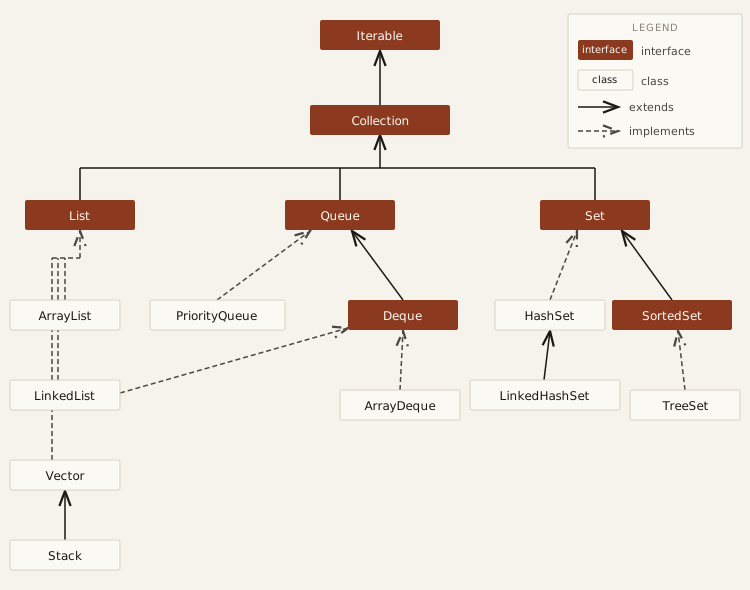
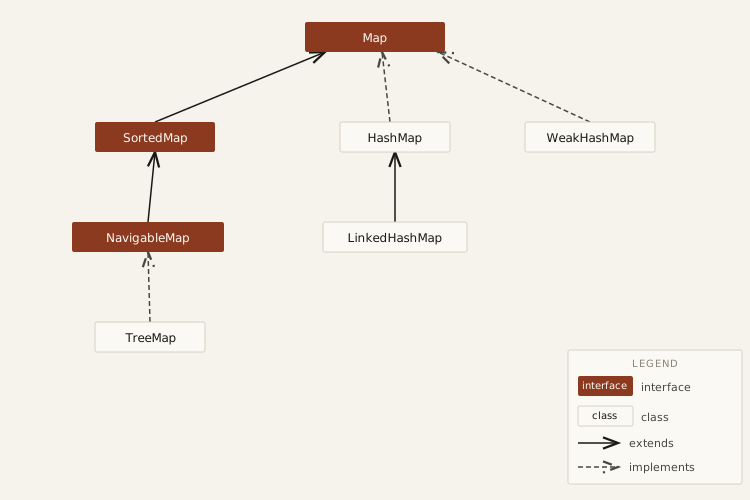
The java.util collections framework provides resizable, type-safe data structures. Always program to the interface (List, Map, Set, Queue), not the concrete class.
List
ArrayList is backed by a resizable array that grows automatically (typically 1.5× when full).
- Access / set by index:
O(1) - Add at end:
O(1)amortized - Insert or delete in the middle:
O(n)— elements must shift
LinkedList is a doubly-linked list where each node holds references to the previous and next node. It also implements Deque, so it can serve as a queue or stack.
- Access by index:
O(n)— must traverse from head - Insert / delete at either end:
O(1) - Insert / delete in the middle:
O(1)once the position is found (traversal is stillO(n))
List<String> arr = new ArrayList<>();
arr.add("a"); // O(1) amortized
arr.get(0); // O(1)
arr.add(0, "x"); // O(n) — shifts everything right
List<Integer> linked = new LinkedList<>();
linked.addFirst(1); // O(1)
linked.addLast(2); // O(1)
linked.get(1); // O(n) — traversalQueue
Java offers three common Queue implementations:
- PriorityQueue — binary min-heap; polls the smallest element first. Does not support random access.
nullnot allowed. - ArrayDeque — resizable circular array; the preferred
QueueandStackimplementation. Faster thanLinkedListfor most use cases.nullnot allowed. - LinkedList — doubly linked list; implements both
QueueandDeque. Allowsnullelements.
// Queue (FIFO)
Queue<Integer> q = new ArrayDeque<>();
q.offer(1); q.offer(2);
q.poll(); // 1
// Stack (LIFO) — prefer ArrayDeque over Stack class
Deque<Integer> stack = new ArrayDeque<>();
stack.push(1); stack.push(2);
stack.pop(); // 2
// PriorityQueue — always polls minimum
Queue<Integer> pq = new PriorityQueue<>();
pq.offer(5); pq.offer(1); pq.offer(3);
pq.poll(); // 1Set
| Operation | HashSet | LinkedHashSet | TreeSet |
|---|---|---|---|
| Add | O(1) avg | O(1) avg | O(log n) |
| Remove | O(1) avg | O(1) avg | O(log n) |
| Contains | O(1) avg | O(1) avg | O(log n) |
| Iteration order | Unordered | Insertion order | Sorted |
| Memory overhead | Low | Higher (linked list) | Medium (tree nodes) |
- HashSet — uses hashing internally (
HashMapbackend). No guaranteed iteration order. Best for fast lookup, insert, delete. Allows onenullelement. - LinkedHashSet — hash table + linked list. Preserves insertion order. Slightly more memory than
HashSet. - TreeSet — internally a Red-Black tree. Elements are always sorted (natural order or custom
Comparator).nullnot allowed. All operations areO(log n).
Set<String> hash = new HashSet<>(); // fast, unordered
Set<String> linked = new LinkedHashSet<>(); // insertion order
Set<String> tree = new TreeSet<>(); // always sorted
tree.add("banana"); tree.add("apple"); tree.add("cherry");
System.out.println(tree); // [apple, banana, cherry]Map
| Operation | HashMap | LinkedHashMap | TreeMap |
|---|---|---|---|
| get / put | O(1) avg | O(1) avg | O(log n) |
| remove | O(1) avg | O(1) avg | O(log n) |
| Iteration order | Unordered | Insertion / access order | Sorted by key |
| Memory overhead | Low | Medium (linked list) | Medium (tree nodes) |
- HashMap — fastest, unordered, general-purpose map. Allows one
nullkey. - LinkedHashMap — preserves insertion (or access) order; slightly more memory. Can implement an LRU cache by overriding
removeEldestEntry. - TreeMap — keys always sorted; supports range operations (
subMap,headMap,tailMap). Slower than hash maps.
Map<String, Integer> map = new HashMap<>();
map.put("a", 1);
map.getOrDefault("b", 0); // 0 — safe default
map.putIfAbsent("a", 99); // no-op, key exists
map.containsKey("a"); // true
// Iterate entries
for (var entry : map.entrySet()) {
System.out.println(entry.getKey() + " -> " + entry.getValue());
}
// TreeMap — keys sorted automatically
Map<String, Integer> sorted = new TreeMap<>(map);
// Immutable factory methods (Java 9+)
Map<String, Integer> scores = Map.of("Alice", 95, "Bob", 87);Sorting and Comparator
Arrays.sort and Collections.sort
Arrays.sort sorts primitive arrays using a dual-pivot quicksort (O(n log n)) and object arrays using TimSort. Collections.sort delegates to the same TimSort and is stable — equal elements keep their original order.
int[] nums = {5, 2, 8, 1};
Arrays.sort(nums); // [1, 2, 5, 8]
List<String> names = new ArrayList<>(List.of("banana", "apple", "cherry"));
Collections.sort(names); // [apple, banana, cherry]
// Sort a subrange
Arrays.sort(nums, 1, 3); // sorts indices 1..2 onlyComparator
A Comparator<T> defines a custom ordering. It returns a negative int, zero, or a positive int when the first argument is less than, equal to, or greater than the second.
// Lambda form
Comparator<String> byLength = (a, b) -> a.length() - b.length();
// Comparator.comparing — cleaner, avoids integer overflow issues
Comparator<String> byLengthSafe = Comparator.comparingInt(String::length);
// Chain with thenComparing
Comparator<String> byLengthThenAlpha =
Comparator.comparingInt(String::length)
.thenComparing(Comparator.naturalOrder());
// Reverse
Comparator<String> desc = Comparator.comparingInt(String::length).reversed();
List<String> words = new ArrayList<>(List.of("fig", "apple", "kiwi", "plum"));
words.sort(byLengthThenAlpha); // [fig, kiwi, plum, apple]Comparable vs Comparator
| Comparable | Comparator | |
|---|---|---|
| Where defined | Inside the class itself | Outside — separate object or lambda |
| Method | compareTo(T o) | compare(T a, T b) |
| Orderings per class | One (natural order) | Many — pass different instances |
| Use when | Class has one obvious sort order | Sorting by different fields or externally |
// Comparable — natural order baked into the class
class Product implements Comparable<Product> {
String name;
double price;
@Override
public int compareTo(Product other) {
return Double.compare(this.price, other.price);
}
}
// Comparator — sort Products by name externally
Comparator<Product> byName = Comparator.comparing(p -> p.name);
products.sort(byName);Sorting records and maps
// Sort map entries by value
Map<String, Integer> scores = Map.of("Alice", 90, "Bob", 75, "Carol", 85);
scores.entrySet().stream()
.sorted(Map.Entry.comparingByValue(Comparator.reverseOrder()))
.forEach(e -> System.out.println(e.getKey() + ": " + e.getValue()));
// Alice: 90, Carol: 85, Bob: 75
// TreeMap keeps keys in sorted order automatically
Map<String, Integer> sorted = new TreeMap<>(scores); // keys sorted A-ZConcurrency & Parallelism
Java has first-class support for multi-threading built into the language and standard library. The core challenge is coordinating shared mutable state safely across threads.
Threads — Runnable & Callable
A thread is the smallest unit of execution. Runnable is for tasks with no return value; Callable is for tasks that return a result or throw a checked exception.
// Runnable — no return value
Thread t = new Thread(() -> System.out.println("running"));
t.start();
t.join(); // wait for it to finish
// Callable — returns a value
Callable<Integer> task = () -> 42;
// Thread states: NEW → RUNNABLE → BLOCKED/WAITING/TIMED_WAITING → TERMINATED
System.out.println(t.getState()); // TERMINATEDExecutorService & thread pools
Creating raw threads is expensive. ExecutorService manages a pool of reusable threads. Always shut it down when done to release resources.
import java.util.concurrent.*;
// Fixed pool — good when you know the concurrency level
ExecutorService pool = Executors.newFixedThreadPool(4);
// Submit a Runnable
pool.execute(() -> System.out.println("task"));
// Submit a Callable, get a Future
Future<Integer> future = pool.submit(() -> 42);
int result = future.get(); // blocks until done
// Scheduled execution
ScheduledExecutorService sched = Executors.newScheduledThreadPool(1);
sched.schedule(() -> System.out.println("delayed"), 2, TimeUnit.SECONDS);
sched.scheduleAtFixedRate(() -> System.out.println("tick"), 0, 1, TimeUnit.SECONDS);
// Always shut down
pool.shutdown(); // no new tasks, finish existing
pool.shutdownNow(); // interrupt running taskssynchronized & volatile
synchronized acquires an intrinsic lock (monitor) on an object, ensuring only one thread executes the block at a time. volatile guarantees visibility — reads always see the latest write — but does not provide atomicity for compound operations.
// synchronized method — locks on 'this'
public synchronized void increment() {
count++;
}
// synchronized block — finer-grained control
private final Object lock = new Object();
public void increment() {
synchronized (lock) {
count++;
}
}
// volatile — safe flag between threads, NOT safe for increment
private volatile boolean running = true;
public void stop() { running = false; }
public void run() { while (running) { /* work */ } }Lock & ReentrantLock
ReentrantLock is an explicit lock with more control than synchronized: tryLock with timeout, interruptible locking, and fairness policy. Always release in a finally block.
import java.util.concurrent.locks.*;
ReentrantLock lock = new ReentrantLock();
lock.lock();
try {
// critical section
} finally {
lock.unlock(); // must release even if exception is thrown
}
// tryLock — non-blocking attempt
if (lock.tryLock(100, TimeUnit.MILLISECONDS)) {
try { /* work */ } finally { lock.unlock(); }
} else {
System.out.println("could not acquire lock");
}
// ReadWriteLock — multiple readers OR one writer
ReadWriteLock rwLock = new ReentrantReadWriteLock();
rwLock.readLock().lock(); // concurrent reads allowed
rwLock.writeLock().lock(); // exclusive writeAtomic classes
The java.util.concurrent.atomic package provides lock-free thread-safe operations using CPU-level compare-and-swap (CAS). Prefer these over synchronized for simple counters and flags.
import java.util.concurrent.atomic.*;
AtomicInteger counter = new AtomicInteger(0);
counter.incrementAndGet(); // thread-safe ++
counter.addAndGet(5); // thread-safe +=
counter.compareAndSet(5, 10); // set to 10 only if current value is 5
AtomicBoolean flag = new AtomicBoolean(false);
flag.compareAndSet(false, true); // atomic test-and-set
AtomicLong id = new AtomicLong(0);
AtomicReference<String> ref = new AtomicReference<>("initial");
ref.compareAndSet("initial", "updated");Concurrent collections
The standard collections are not thread-safe. Use these drop-in replacements instead of wrapping with Collections.synchronizedXxx():
ConcurrentHashMap— segment-level locking; far better throughput than a synchronized mapCopyOnWriteArrayList— writes copy the entire array; ideal for read-heavy, rarely-written listsLinkedBlockingQueue/ArrayBlockingQueue— thread-safe FIFO queues;put()blocks when full,take()blocks when empty
ConcurrentHashMap<String, Integer> map = new ConcurrentHashMap<>();
map.put("a", 1);
map.computeIfAbsent("b", k -> k.length()); // atomic read-compute-write
BlockingQueue<String> queue = new LinkedBlockingQueue<>(100);
queue.put("item"); // blocks if full
String item = queue.take(); // blocks if emptySynchronization utilities
- CountDownLatch — one or more threads wait until a countdown reaches zero. One-shot; cannot be reset.
- CyclicBarrier — a group of threads wait for each other at a barrier point. Reusable after each cycle.
- Semaphore — limits the number of threads accessing a resource concurrently.
// CountDownLatch — wait for N tasks to complete
CountDownLatch latch = new CountDownLatch(3);
pool.execute(() -> { doWork(); latch.countDown(); });
pool.execute(() -> { doWork(); latch.countDown(); });
pool.execute(() -> { doWork(); latch.countDown(); });
latch.await(); // main thread blocks until count == 0
// CyclicBarrier — synchronize N threads at a checkpoint
CyclicBarrier barrier = new CyclicBarrier(3, () -> System.out.println("all reached barrier"));
// each thread calls barrier.await() to wait for the others
// Semaphore — max 3 threads in the critical section at once
Semaphore sem = new Semaphore(3);
sem.acquire();
try { /* limited resource */ } finally { sem.release(); }CompletableFuture
CompletableFuture (Java 8+) enables non-blocking async pipelines. Stages are chained and executed on the common ForkJoinPool by default, or a custom executor.
import java.util.concurrent.CompletableFuture;
// Simple async task
CompletableFuture<String> cf = CompletableFuture.supplyAsync(() -> "hello")
.thenApply(s -> s.toUpperCase()) // transform result
.thenApply(s -> s + "!") // chain another transform
.exceptionally(ex -> "error: " + ex.getMessage()); // handle failure
String result = cf.get(); // "HELLO!"
// Run two tasks in parallel, combine results
CompletableFuture<Integer> a = CompletableFuture.supplyAsync(() -> 20);
CompletableFuture<Integer> b = CompletableFuture.supplyAsync(() -> 22);
CompletableFuture<Integer> sum = a.thenCombine(b, Integer::sum);
sum.thenAccept(System.out::println); // 42
// Wait for all / any
CompletableFuture.allOf(a, b).join(); // wait for all
CompletableFuture.anyOf(a, b).join(); // wait for firstForkJoinPool
ForkJoinPool is designed for recursive divide-and-conquer tasks. It uses work stealing — idle threads steal tasks from busy threads' queues — making it efficient for CPU-bound parallel work.
import java.util.concurrent.*;
// RecursiveTask returns a value; RecursiveAction does not
class SumTask extends RecursiveTask<Long> {
private final int[] arr;
private final int lo, hi;
private static final int THRESHOLD = 1000;
SumTask(int[] arr, int lo, int hi) {
this.arr = arr; this.lo = lo; this.hi = hi;
}
@Override
protected Long compute() {
if (hi - lo <= THRESHOLD) {
long sum = 0;
for (int i = lo; i < hi; i++) sum += arr[i];
return sum;
}
int mid = (lo + hi) / 2;
SumTask left = new SumTask(arr, lo, mid);
SumTask right = new SumTask(arr, mid, hi);
left.fork(); // schedule left asynchronously
return right.compute() // compute right in current thread
+ left.join(); // wait for left result
}
}
int[] data = new int[1_000_000];
ForkJoinPool pool = ForkJoinPool.commonPool();
long total = pool.invoke(new SumTask(data, 0, data.length));
// Parallel streams use ForkJoinPool.commonPool() internally
long count = IntStream.range(0, 1_000_000)
.parallel()
.filter(n -> n % 2 == 0)
.count();